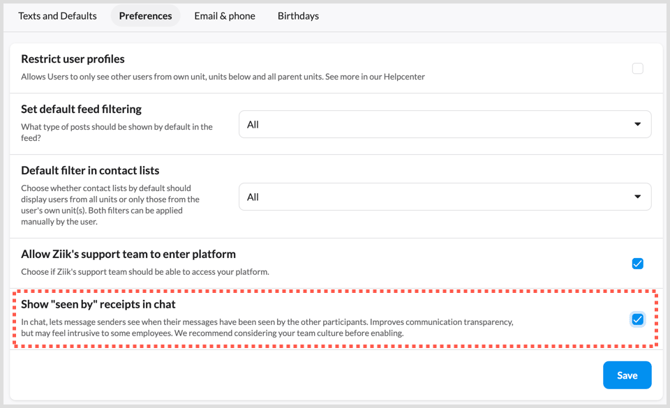
"Seen by" in chat
Enabling Seen by lets users see who has seen their chat message. Here's how it works.
The setting is off by default and is controlled centrally in the admin panel It applies to chat across your whole platform — it can't be enabled for individual conversations.
Why enable it
- Senders know a message has landed, without having to ask or chase a reply
- Useful where chat carries operational information — shift changes, urgent notices, handovers
- Reduces duplicate messages sent "just in case"
Before you enable it
Read receipts change how a conversation feels. Some employees experience them as pressure to respond immediately, or as monitoring — particularly outside working hours.
Consider:
- Your culture. Does your organisation already use read receipts elsewhere (SMS, WhatsApp, Teams)? If so, this will feel familiar.
- Expectations. Being seen is not the same as being actioned. Make it clear that a receipt isn't a commitment to reply.
- Working hours. Receipts can make it visible when someone reads a message on their own time.
We recommend discussing it with managers and employee representatives before turning it on.
How to enable it
- Go to the admin panel.
- Open Preferences
- Turn on Show "seen by" receipts in chat.
-
Pres Save